Event Manny Progress Blog

Written by Brian Roberts a magician skilled in the dark of art of time manipulation. Follow him on Twitter. Try EventManny yourself.

Missing feature - Finding conflicts

April 19, 2020

(This is part of a series of posts about missing features in calendaring.
For more context, see calendaring - the missing features.)

Calendaring is missing an easy way to find conflicts for new and pre-existing events.

Conflicts are not a first-class concept in current calendaring solutions. To me, conflicts are very important --- an event represents a real-world obligation on a schedule. If you have a conflict, then you cannot fulfill all of the obligations and need to communicate that.

In current calendaring solutions, it is possible to see conflicts when entering a single event (depending on the entry mode, it is more clear). However, there is no easy way to see scheduling conflicts for all events in a schedule or of your entire calendar.

Conflicts entering a single event

Entering a single event in the Google calendar view allows seeing conflicts immediately:
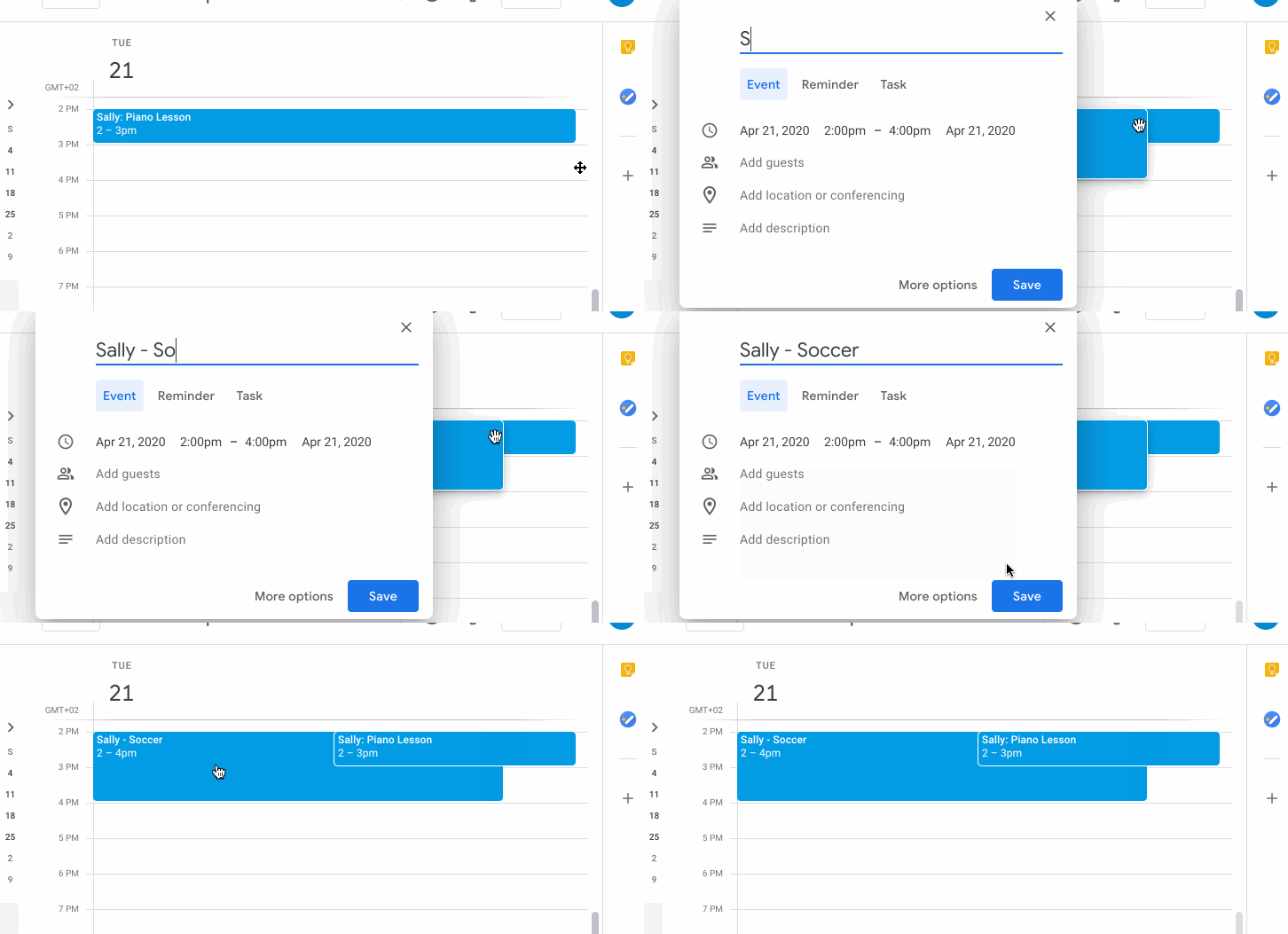
google calendar conflicts add calendar view

Using the “Create” button does not allow viewing of conflicts:
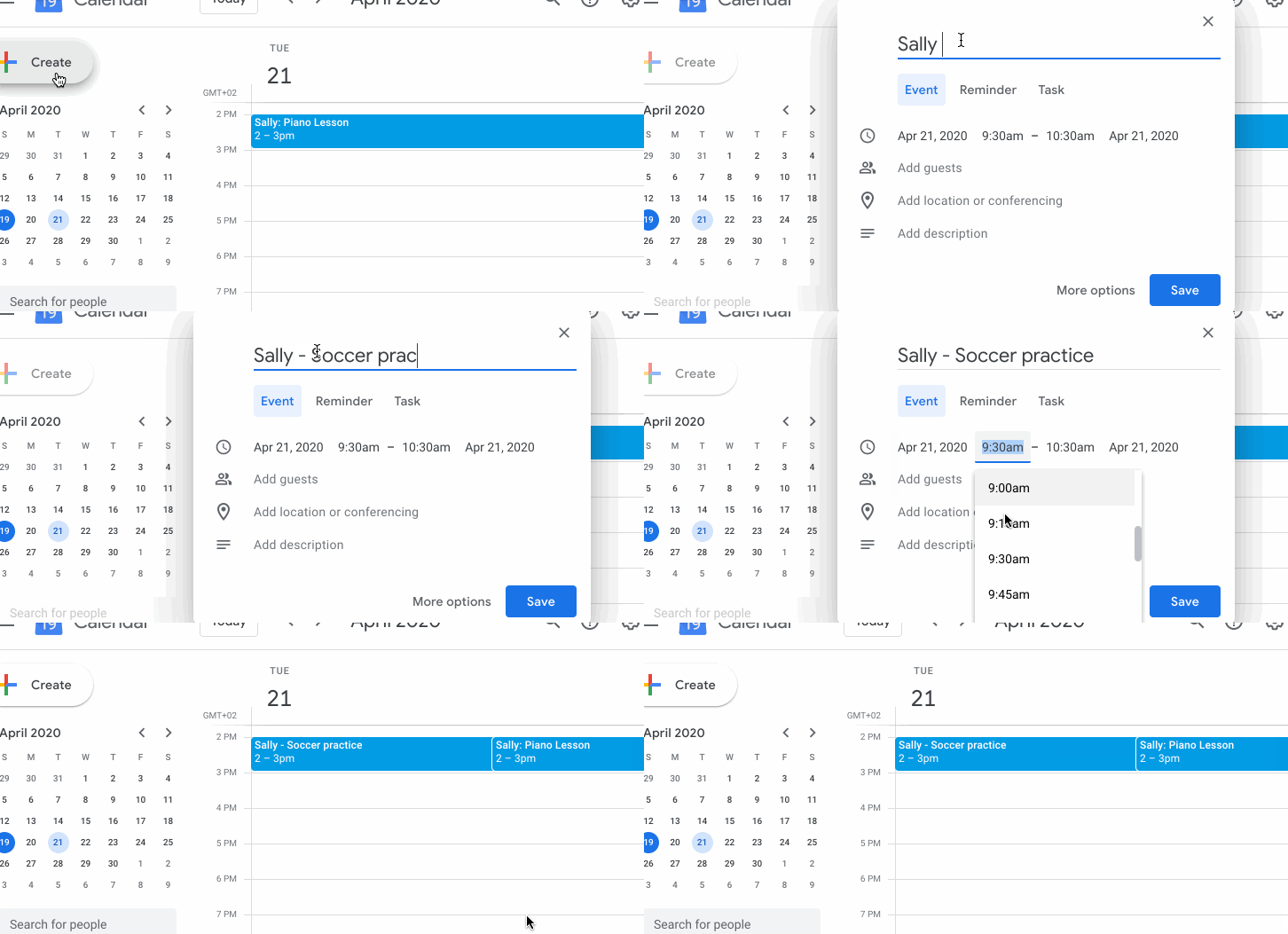
google calendar conflicts create button

Choosing “More options” and selecting the “Find a time” pane allows seeing conflicts:
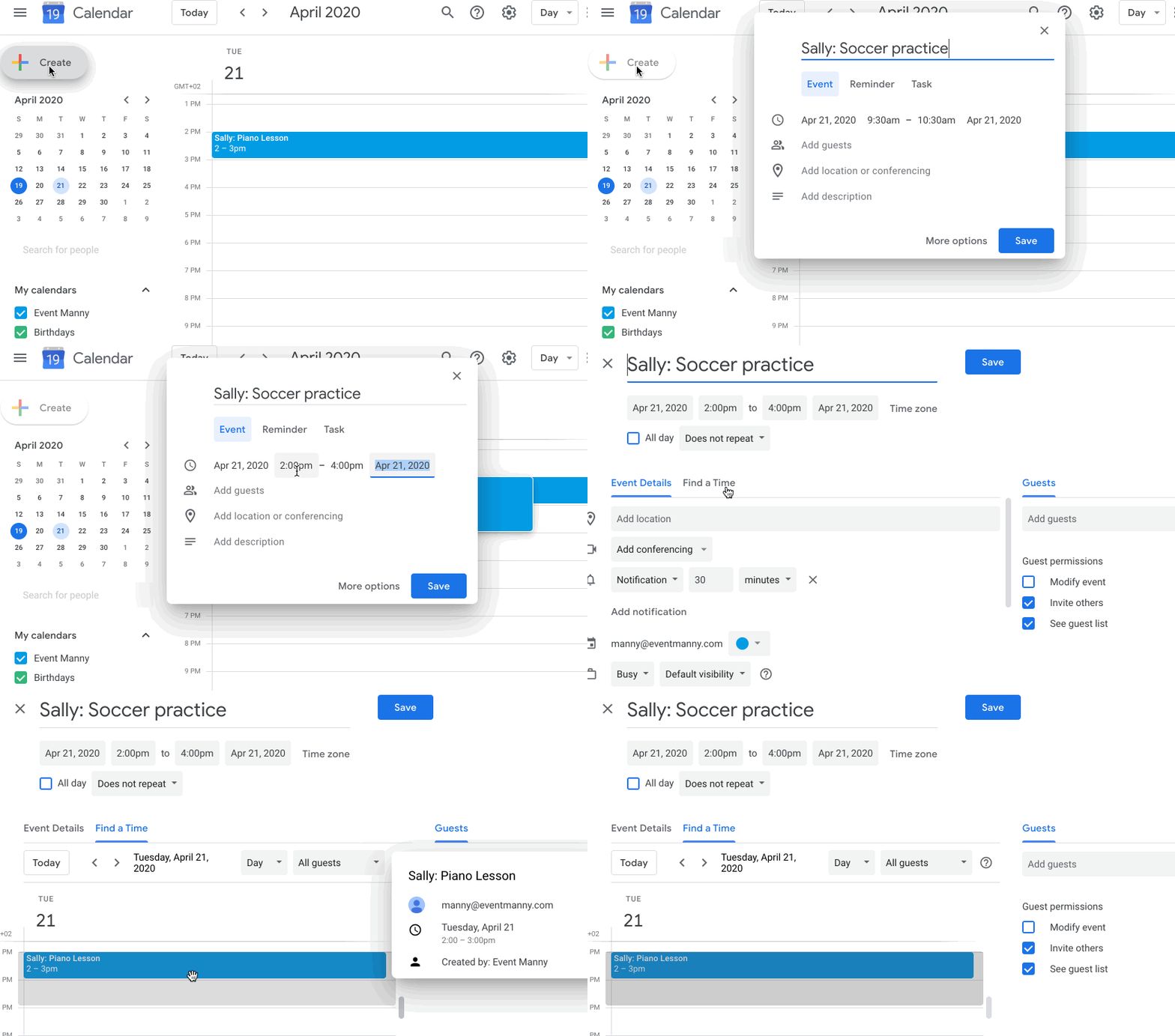
google calendar conflicts create more options

Conflicts entering multiple events

In Google calendar and other calendaring solutions, this requires navigating to each date in order to see conflicts for each new event.

How I want to solve this

Conflicts should be a first-class concept in calendaring. You should be able to find conflicts between any set of events and any other set of events. See use cases for a new schedule and an updated schedule.
Mock-ups (or implementations) to come.

(Part of a series on calendaring - the missing features.)
Missing feature - Grouping events

April 14, 2020

(This is part of a series of posts about missing features in calendaring.
For more context, see calendaring - the missing features.)

Calendaring is missing an easy way to group events together into schedules, view those events and manipulate them together.

In my mind, a calendar is not simply a set of events. It is a set of sets of events. It is not just a grab bag of events all mixed together, each event is a representation of a real-world obligation attached to an activity that you do. Each real world activity (e.g. a sport team, piano lessons, dance) has a set of events, which I will call a schedule.

There is no easy way to represent and manipulate a schedule in calendaring applications.

Google calendar

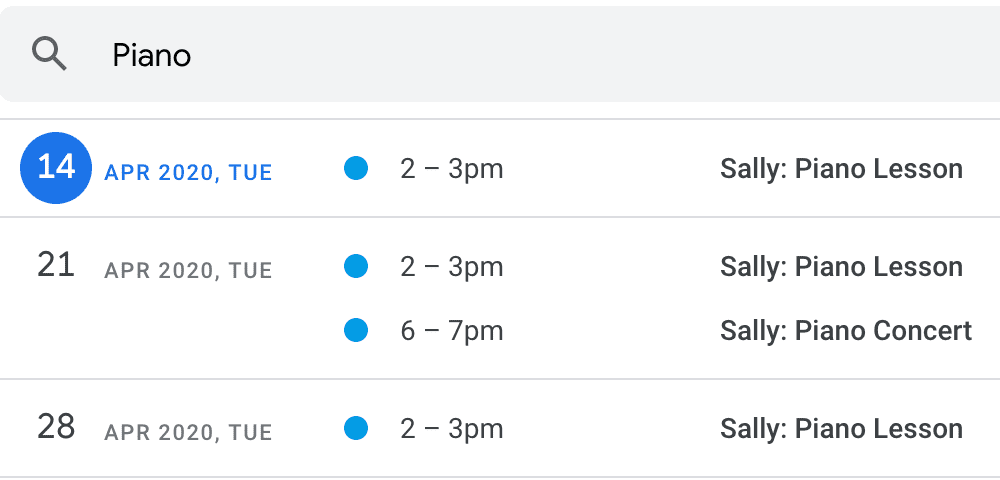
In Google Calendar, you can partially work around this by ensuring each event has a consistent tag you can search for, for example, “Piano”:

google calendar search piano

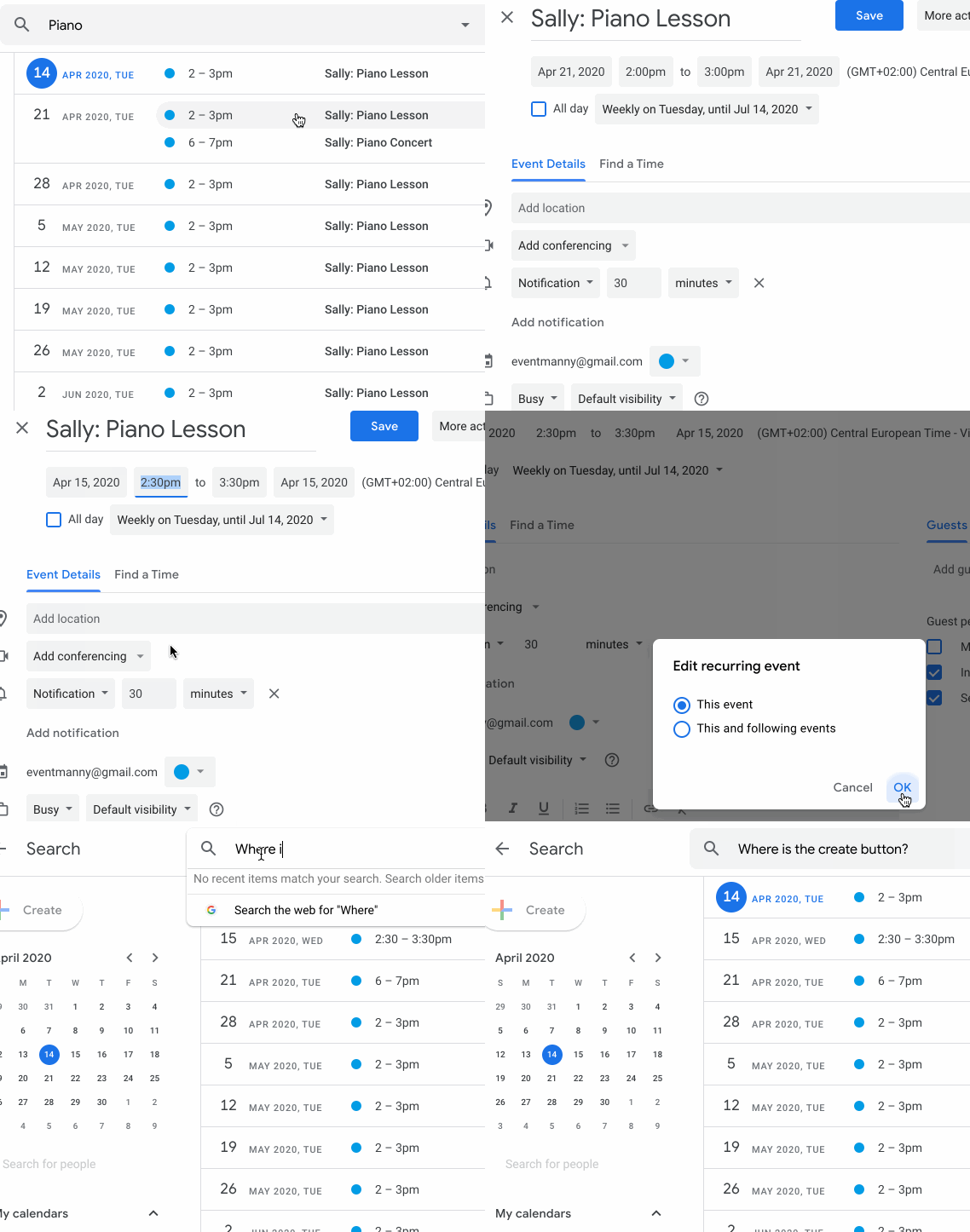
But look at how hard it is to make a change to a single event in this group:

google calendar manipulate group

While viewing a search result, you cannot add a new event!

Cozi calendar

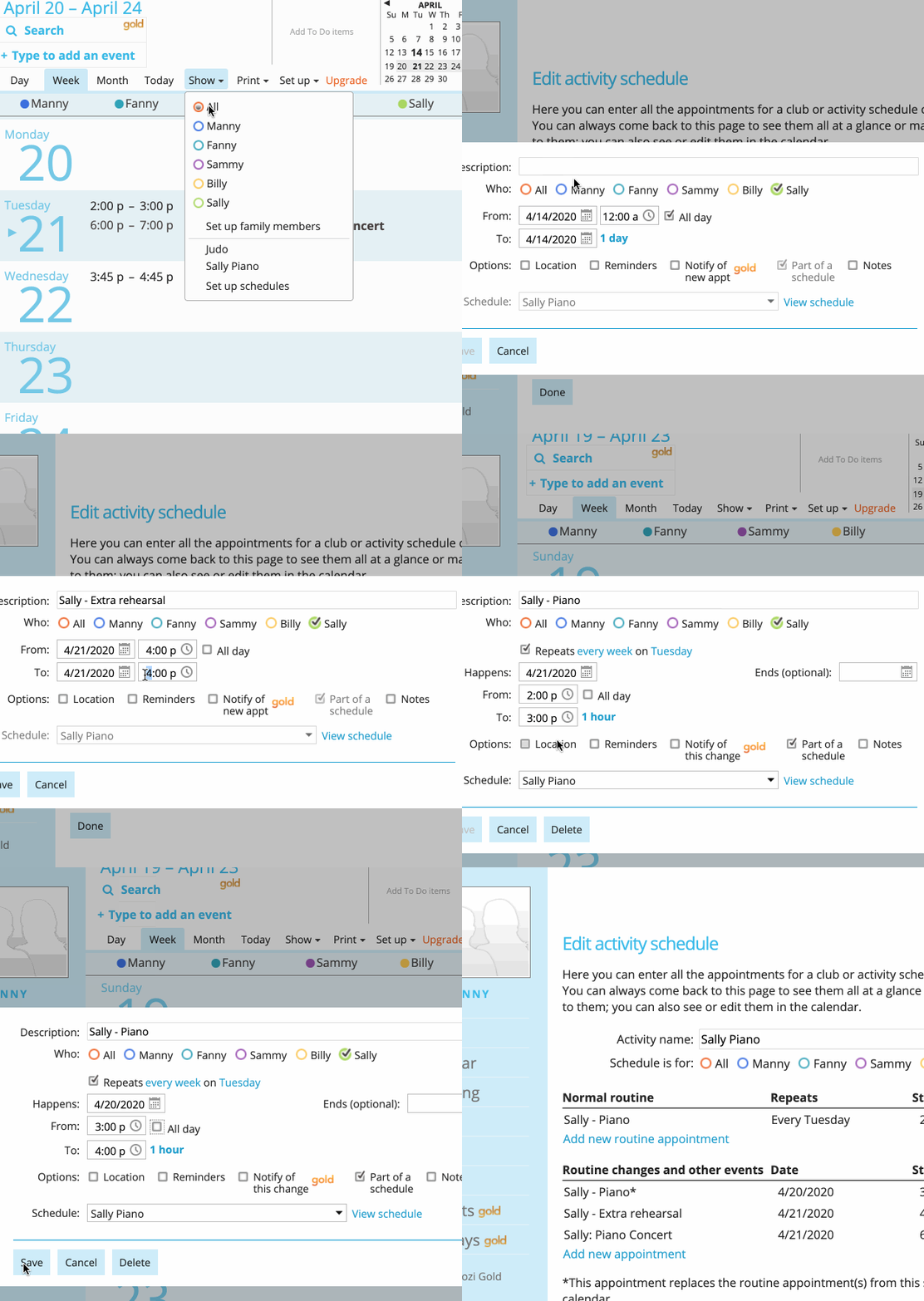
The Cozi calendar application does a better job at this, allowing:

  • Viewing all events in a schedule together (including recurring events, exceptions and one-off events)
  • Adding an event on your calendar to a schedule
  • Assigning people to a schedule (or individual events)

cozi calendar manipulate group

However, adding exceptions can only be done on the main calendar page, not directly in the schedule page. Changing the datetime of an event is a multiple step process (open event, select time field, change time, save). Deleting is similar. If you need to change or delete multiple events at once, these manual steps become tedious.

How I want to solve this

See use cases for a new schedule and an updated schedule.
Mock-ups (or implementations) to come.

(Part of a series on calendaring - the missing features.)
Calendaring - the missing features

April 13, 2020

Calendaring is missing a few features for me. I won’t claim that the features are useful to anyone else, just important to me.

Consumer calendaring applications are built to support some standard features.

  • Create a single or recurring event

    • Possibly showing other events happening at the same time, such as via Google Calendar’s “Find a Time” component in its event creation screen.
    • Add details such as a description, location, guests, notifications
  • Read

    • Show events in a daily, weekly, monthly or agenda view
    • Show details of a single event
    • Search for events by title or description
  • Update a single or recurring event
  • Delete a a single or recurring event

Additionally, some applications or add-ons allow simple organization of events.

  • creating multiple calendars
  • sharing calendars with others
  • Cozi: creating “schedules” that contain a list of events and adding family members to an event or schedules
  • Google Calendar Tags add-on: a prettier way to shows tags on events in Google Calendar

These features are not enough for my use cases. I believe that calendaring applications are missing the following features, and I will dive deeper into the each underlying use case in future posts.

  • Creating multiple events more quickly
  • Easy grouping of events into series (e.g. for a rehearsal schedule)
  • Better handling of exceptions in recurring events (e.g. all children’s events do not happen during school vacations)
  • Adding images to events or series (e.g. document for rehearsal schedule)
  • Showing conflicts for events
  • Showing recent updates
  • Deleting multiple events more easily

Follow along with my journey to creating a better calendaring system.

Missing features series:

  1. Introduction
  2. Grouping Events
  3. Finding Conflicts